Customizing your iPhone in 2026 is no longer just about swapping wallpapers. With iOS 26, users can build full aesthetic systems—matching icons, layered widgets, interactive lock screens, and Pinterest-style layouts that feel intentional rather than random. But one question keeps coming up: which apps are actually free—and which hide everything behind a subscription?
In this guide, we break down the top free iPhone theme and widget apps based on real feature access, free-tier transparency, iOS 26 compatibility, and ease of setup. We’ll compare Widgetsmith, iScreen and ScreenKit, show what you can truly use without paying, and help you choose the right app for your style and skill level.
Quick Picks: The Best Free iPhone Widget & Theme Apps Right Now
If you want the fast answer, here are the top free apps worth installing in 2026:
Best for DIY widget control: Widgetsmith
Best for iOS 26-optimized full themes: iScreen
Best for huge aesthetic libraries: ScreenKit
Widgetsmith remains a top recommendation in MakeUseOf’s 2025 iPhone app roundup, praised for allowing users to control widget size, font, color, and layout instead of sticking to Apple’s default look (MakeUseOf, 2025). It’s ideal if you enjoy building widgets from scratch.
iScreen, meanwhile, announced full iOS 26 compatibility on September 25, 2025, alongside surpassing 100 million users worldwide (PRNewswire, 2025). That scale matters—it signals long-term updates and OS alignment rather than trend-driven packs.
ScreenKit, highlighted in 2025 free-widget coverage, stands out for its massive icon and widget library, including 5,000+ icons and 500+ widget styles (Nugget iOS, 2025). It’s a strong choice for aesthetic variety.
What’s Actually Free? Transparent Feature Comparison
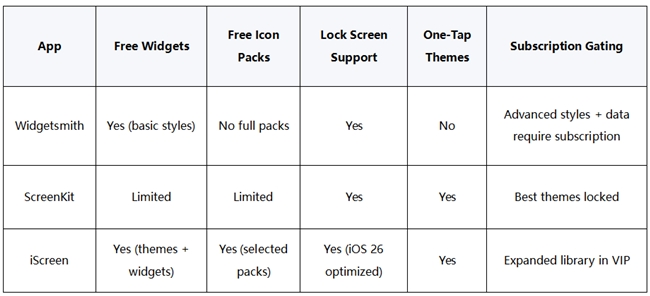
Free doesn’t always mean fully usable. Below is a simplified comparison of what you can access without paying.
Choosing the Right App for Your Customization Style
Not all users want the same level of control. The right app depends on how hands-on you want to be.
For Beginners: One-Tap Theme Installers
If you don’t want to manually configure Shortcuts or resize widgets repeatedly:
iScreen provides full themes combining wallpaper, icon packs, and widgets designed to work cohesively on iOS 26.
This category is ideal for users who want aesthetic cohesion without editing individual widget settings.
For DIY Creators: Full Custom Control
If you prefer granular customization:
Widgetsmith allows precise control over size, style, font, and timed widget changes (MakeUseOf, 2025).
You can build minimalist calendars, pastel weather blocks, or rotating photo albums.
If your goal is cohesive themes without managing five different apps, all-in-one theme systems—like those offered by iScreen—simplify the process by bundling wallpaper, icons, and widgets together.
iOS 26 Compatibility: Why It Matters in 2026
iOS updates frequently break widget layouts or visual layers in older apps. That’s why compatibility is critical.
On September 25, 2025, iScreen announced full iOS 26 compatibility along with new creative features and expanded global reach. That includes optimization for updated widget behaviors and layout systems.
Why this matters:
OS 26 introduced deeper layering and interactive widget behavior.
Apps not optimized may display incorrectly after system updates.
Lock Screen widgets require updated permissions and layout compliance.
With more than 100 million users, iScreen’s large-scale adoption suggests sustained update support rather than short-term trend cycles .
In 2026, OS optimization isn’t optional—it determines whether your aesthetic layout survives the next update.
Frequently Asked Questions
1. Are there truly free iPhone widget apps in 2026?
Yes, but most operate on a freemium model.
2. What’s the easiest app for beginners?
iScreen and ScreenKit are strong beginner options because they support one-tap theme installation rather than manual configuration (Nugget iOS, 2025).
3. Do these apps work with Lock Screen widgets?
Yes. Most major apps now support both Home and Lock Screen widgets. iScreen confirmed full iOS 26 compatibility in September 2025 (PRNewswire, 2025).
4. How many widget sizes are supported?
iPhone supports multiple Home Screen widget sizes (Small, Medium, Large) and Lock Screen widgets in two sizes (UPUP, 2025).
5. Which app is best for full aesthetic themes instead of single widgets?
If you want a complete matching system—icons, wallpaper, and widgets in one package—apps like iScreen is more efficient than standalone widget builders.
Choosing the best free iPhone theme app in 2026 comes down to three measurable factors: how much is actually free, how well the app supports iOS 26, and whether you prefer DIY control or one-tap themes. Widgetsmith remains the customization powerhouse for manual creators. And iScreen differentiates itself through full iOS 26 optimization and a user base exceeding 100 million.
If you want aesthetic cohesion without juggling multiple apps—and care about long-term OS compatibility—you can explore iScreen’s Free iOS 26 Themes directly at https://www.iscreenapp.com/.